Nexus project history
The Nexus project history provides an overview of all deployments performed with this project. It also provides a way to roll back to previous deployments.
View project history
Select Nexus in the top menu. You are presented with the list of current Nexus projects.

Access the project you want to configure by selecting it in the list.
Select the History tab.
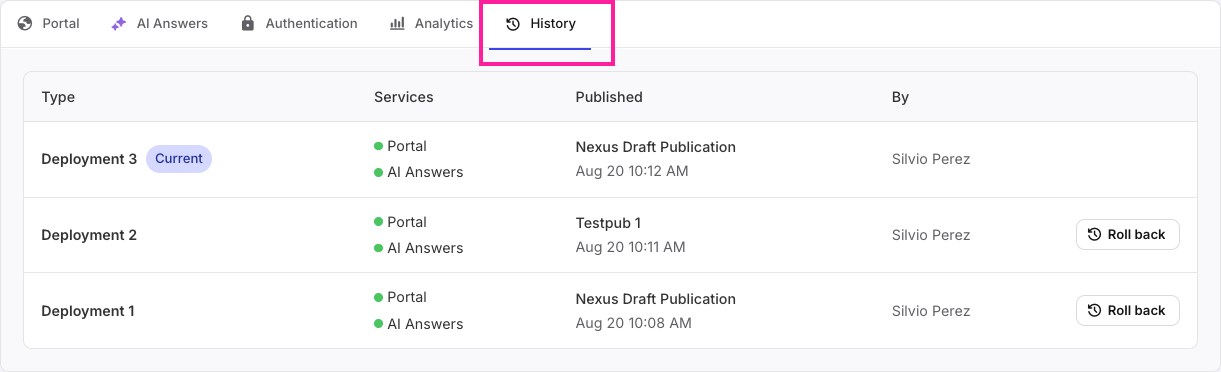
The project history shows various metadata related to the project:

Type: The name of the deployment, including a status badge. The status badge can read Deploying
 while the publication is being deployed to the server, or Current
  to indicate which deployment is currently live.
Services: indicates which Nexus services have been included in this deployment.
Published: includes the name of the publication used in this deployment, as well as the date and time it was deployed.
Note
If a deployment was rolled back, it will still show the date and time of the initial deployment, not the date and time of the roll-back.
By: the name of the Paligo user who initiated the deployment.
Roll back to a previous deployment
If you want to redeploy a previous deployment for any reason:
Select Nexus in the top menu. You are presented with the list of current Nexus projects.
Access the project you want to configure by selecting it in the list.
Select the History tab.
In the list, locate the deployment you want to roll back to. Select the Roll back button
 for that deployment.
The confirmation dialog will show you what will be going live once you roll back this deployment.
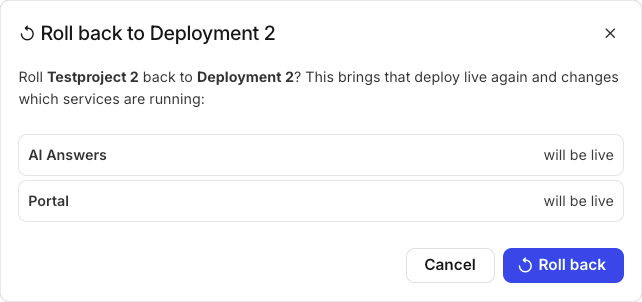
Select Roll back
 to confirm.
The deployment will now show that it is Current with its status badge.
Note
Since no new data needs to be written to the server, this change will be fairly instantaneous.