Paligo Documentation
Paligo Glossary
Paligo is based on the topic-based authoring paradigm. This type of authoring has its own terminology and Paligo adds some of its own. It can therefore be useful to get familiar with some of these concepts.
- Accordion
A collapsible section is achieved by adding the element attribute
rolewith the valueaccordion.An accordion looks like an arrow in the output.

In the Paligo Editor a section with the accordion attribute gets a menu icon.

- Admonition
An umbrella term for elements that are specifically made to contain safety content or information that needs to stand out in some way. You can choose between
note,notice,caution,warning,danger,importantandtip. They can be styled in the Layout Editor.
An admonition with no title will by default output an automatic label, "Note", "Warning" and so on. You therefore do not have to enter such text manually. The label is automatically translated when publishing to other languages. Admonitions can also be created as separate topic types to be reused.
- Allowlisting
Allowlisting is to grant network access to specific IP addresses.
- Appendix
An appendix topic is much like a regular topic, but will behave differently when it comes to numbering, using the established letter numbering for appendices.
Appendix topics should always come last in a publication, and must always be on the top level. If you want child topics for your appendix, use regular topics for that. Learn more, see Appendix Component.
- Attribute
This is a type of metadata that can be additionally set on an element to provide more information that can be used for processing the content. For example one attribute you may often use on images:
width. Attributes are also used when Filtering / Profiling. Element attributes are managed in the Element Attributes Panel.- Back Recto
The inner side of a back cover.
- Back Verso
The outer side of a back cover.
- Branch
With a branch, you create a new version of a publication or topic. The new version (the branch) acts like a copy, but Paligo understands it is related to the original version. This means that the original and the branch can be used separately as parallel versions, or, if needed, they can be merged back into a single version later.
The original file gets a symbol that shows that there is a branch available.

The branched file gets a green symbol that shows that it is a branch.


To learn more about branching, see Branching.
- Component
An umbrella term for any type of text content resource in Paligo, for example topics, admonitions and publications.
- Element
This means an XML element, sometimes also called a "tag". Elements are highlighted like this in this help guide:
procedureTo learn more about elements, see Elements as structured content.
- Element Attributes Panel
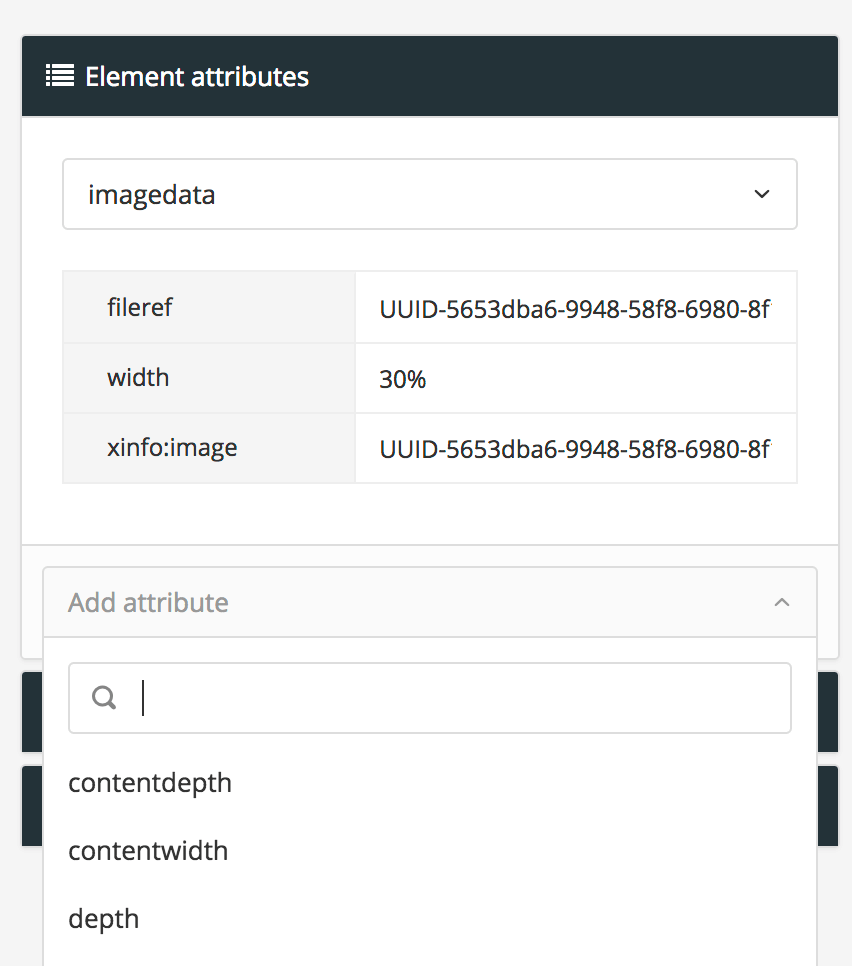
The Element Attributes Panel is located to the right in the editor. It allows you to select and set element attributes, such as width for images, filter attributes for conditional content and much more.
- Element Context Menu
The menu is displayed with Alt + Enter, with which you can add any element in your topics, apart from the ones available in the toolbar or by shortcuts.

- Element Structure Menu
The "breadcrumbs menu" at the top of the editor below the toolbar, allowing you to see which element is selected in the topic, see the hierarchical structure of the elements, and to manipulate elements in different ways.

- Faceted Search
"Faceted Search" is an advanced search feature that is available with some Third-Party search services. It allows users to search for a term and then apply filters to the search results to narrow their search. Learn more, see Faceted Search.
- Federated Search
"Federated Search" is an advanced search feature that is available with some Third-Party search services. It allows you to set your search to find results from multiple sources rather than just one. Learn more, see Federated Search.
- Fork
A "fork" is a special type of link between a publication and its content. This means that it's not the topic or subpublication itself, but a reference (link) that is used in a publication. Learn more, see Forks.
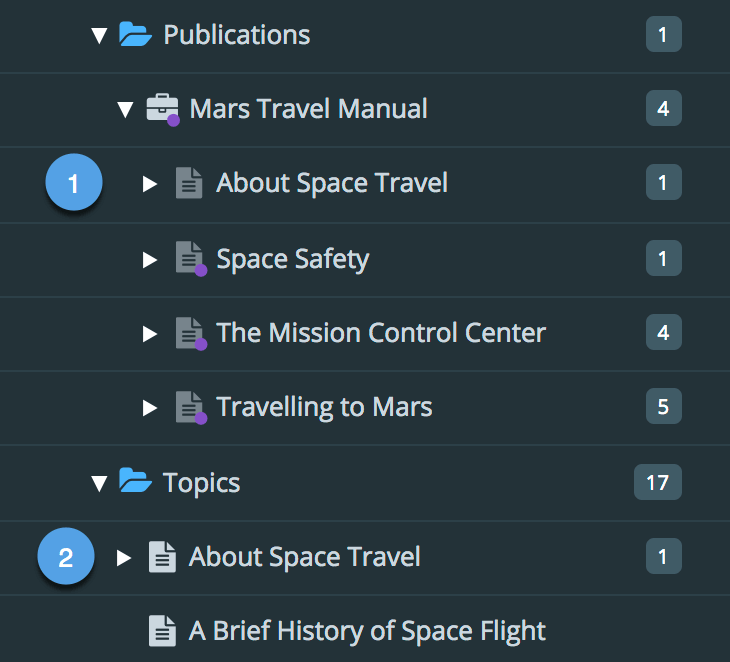
Fork, only a reference (link) to the actual topic
Actual origin topic, where you write your content
- Front Recto
The front side of a front cover.
- Front Verso
The inner side of a front cover.
- Image
As the name implies, an image resource. Note however, that in the topic editing list of elements, image is called "mediaobject". So when inserting an image, select mediaobject. This will automatically insert the imageobject where you can import the image from the image library.

- Informal Topic
A flexible type of component that can be used as a wrapper to reuse almost any block of content within another topic.

- Metadata
The Metadata is the middle section of the Structure View and shows information (metadata) about the publication, topic or component. To learn more, see Structure View.
- Nested Content
A topic, informal topic or admonition that is inserted as a reusable component inside another topic.
- Parent Publication
A main publication that consists of subpublications or a mix of topics and subpublications. This is used when wanting to have multiple publications in the same portal.

- PEF
PEF stands for Paligo Export File. It is created when information is exported from Paligo, but also when creating a snapshot (an archived version of the content).
- Publication
A Publication is like your "table of contents", a type of component that should only hold other components, such as topics and safety messages.

Usually publications will form the structure of entire manuals, knowledge bases, or the like, but can also be used for smaller structures, like chapters or web site categories / sections.
You do not write your content in the publication itself, the content is in the topics reused by the publication.
- Snapshot
When the state of a publication or topic is set to Released in Paligo, an archived version of the content at that particular point in time, called snapshot, is automatically created. It is possible to add a comment that provides more context about the snapshot for other users. A snapshot can also be created manually at any time, for example during a review assignment or contribution assignment. It can be used for comparing versions, but also to restore a previous version.
- Source Code
The source code is the actual source XML in Paligo. Learn more, see Source Code Editor.
- Source Language
A Source Language is the original language the content was written in. A target language is a translation of the source language.
- Subpublication
A publication added to a main publication called Parent Publication. It gets a "reuse" symbol.


- Subsection
A section inside a topic, also called subtopic. If converted to a reusable component it will become a nested topic.
- Subtopic
A topic inside another topic, either as a nested topic or a subsection.
- Template
Templates are components with predefined content that you first create in the Templates library. Any topic created from a template will have that predefined content.

- Topic
The main building block, a
sectionelement, for publications. It may be quite small, containing just a description (a title and a paragraph or two), an instruction or it may be a bit larger. But usually the aim is to make it a self-contained piece of content to build larger publications.
- Variable
A variable is a container for a changeable value or text. The content for the variable is stored in a variable set, which contains all of the possible values. When you publish, you choose which of the values should be used. For example, you could have a product name variable, and then you choose a different product name, depending on what user guide you are publishing.

- Whitelisting
Paligo use the term Allowlisting instead of whitelisting.