Nexus themes
Paligo Theme Studio
Paligo Theme Studio is an extension for Visual Studio Code for building Nexus themes. You edit the theme folder on your computer, and Theme Studio shows it on your real content from Paligo, so you see each change as soon as you save. When the theme is ready, you can push it to a layout without making a ZIP file.
Paligo renders the preview the same way it renders a published site, so what you see in the preview is what the published site will show.
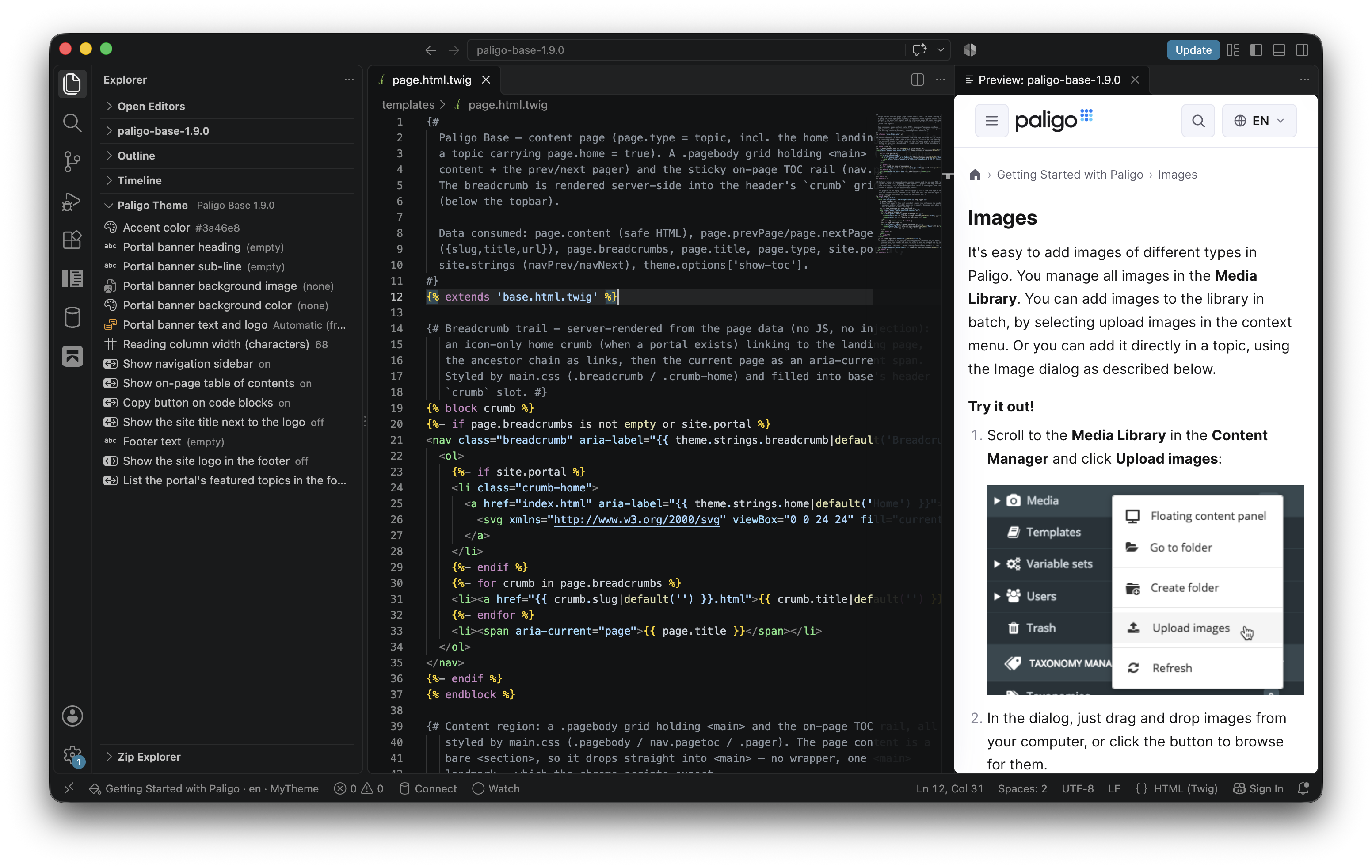
With Theme Studio you can:
Preview a theme on any publication, in any of its languages, with the settings of any theme layout.
Follow links in the preview to other pages of the publication.
Try out the theme's options without changing the layout.
Open the preview in a web browser.
Push the theme to a layout.
Theme Studio needs:
Visual Studio Code on your computer. It doesn't work in VS Code for the web.
Your Paligo username and an API key for that user. See API Keys. Not every user type can use the API. See API Access.
Nexus enabled for your Paligo account.
A theme folder with a
theme.jsonfile at its top. To start one, download Paligo Base, as described in Download a theme.
Install Paligo Theme Studio
Theme Studio is installed from the Visual Studio Marketplace, and connects to Paligo with your API key. To install it and sign in:
In Visual Studio Code, open the Extensions view.
Search for Paligo Theme Studio and select Install.
Open your theme folder with File > Open Folder.
Theme Studio starts when you open a folder that has a
theme.jsonfile in it.Open the Command Palette with Ctrl + Shift ⇧ + P, or Command ⌘ + Shift ⇧ + P on a Mac, and run Paligo: Sign in to instance….
Enter your Paligo instance. You can enter its name, such as
acme, its address, such asacme.paligoapp.com, or a full URL.Enter your Paligo username.
Enter your API key.
Theme Studio checks the key with Paligo and shows Signed in to … as …. The key is stored in your operating system's keychain, not in VS Code's settings.
To sign out, run Paligo: Sign out.
We recommend that you also install an extension for Twig, such as Twig Language 2. Visual Studio Code doesn't recognize Twig on its own, so without one, your templates have no syntax highlighting. A Twig extension may also suggest Twig features that themes can't use, such as range(). See What theme templates can use.
The API key must belong to the username you enter. If it doesn't, Paligo rejects it and Theme Studio says so.
Preview a theme in Paligo Theme Studio
The preview shows a page of one of your publications with the theme in your folder. To preview a theme:
Open your theme folder in Visual Studio Code and sign in, as described in Install Paligo Theme Studio.
Open the Command Palette and run Paligo: Preview theme.
Choose the publication to preview with.
The preview opens beside your files.
The first time you preview a publication that has never been published, Paligo has to build its content first, which can take a few minutes. The preview shows progress while it waits. Later previews of the publication start straight away.
Edit a file in the theme folder and save it.
The preview updates with your change. If the theme has an error, the preview shows it, with the template and line.
To see other pages, select the links in the preview.
The buttons in the preview's title bar change what you are previewing:
Button | What it does |
|---|---|
Refresh preview | Renders the page again. |
Choose preview publication | Previews another publication. |
Choose preview language | Previews the page in another of the publication's languages. |
Choose preview layout | Uses the settings of another theme layout, such as its branding, search engine and custom code. |
Push theme to layout | Uploads the theme to a layout. See Push a theme to a layout. |
Open preview in browser | Opens the preview in your web browser. See Open the preview in a browser. |

The Paligo item in the status bar at the bottom of the window opens a menu with all of Theme Studio's actions.
The preview updates when you save a file, not as you type.
Try out theme options in the preview
You can see how the theme looks with different option values without changing a layout. To try out an option:
In the Explorer, open the Paligo Theme section.
It lists the options in your theme's
theme.json, with the value each one has in the preview.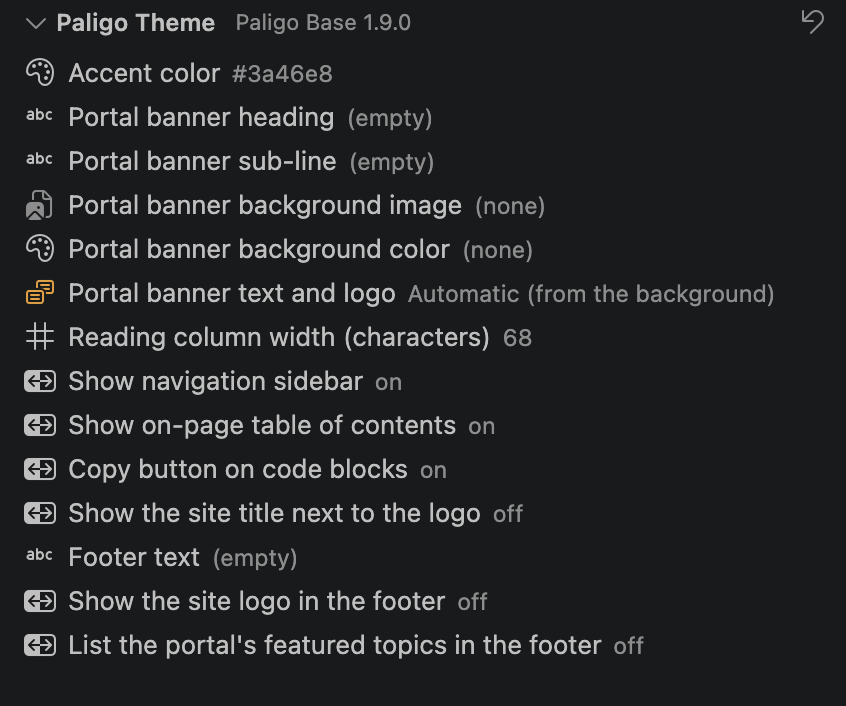
Select an option and choose or enter a new value.
The preview updates with the new value.
To return every option to the theme's default, select Reset theme options to defaults at the top of the Paligo Theme section.
The values you set here apply only to the preview. They aren't pushed with the theme. To set the values a layout publishes with, see Set theme options.
If you have moved the Paligo Theme section to another place and can't find it, run Paligo: Restore theme panel to the Explorer.
Open the preview in a browser
You can open the preview in your web browser, for example to try the theme at different window sizes, to use the browser's developer tools, or to let an AI coding assistant that controls a browser look at the theme. To open the preview in a browser:
Preview the theme, as described in Preview a theme in Paligo Theme Studio.
Select Open preview in browser in the preview's title bar.
The page opens in your default browser.
The browser tab reloads each time you save a file. If a render fails, the problem is shown at the bottom of the page, over the last page that rendered. Links move to other pages, and the browser's Back and Forward buttons work.
The preview is served from your own computer and other computers can't open it. It works only when Visual Studio Code runs on your computer, not in a remote session. About two minutes after you close the last browser tab with the preview, it stops. Select Open preview in browser again to start it again.
Push a theme to a layout
When your theme is ready, you can push it from Theme Studio to a theme layout. This replaces the layout's theme straight away, in the same way as uploading it in the Layout Editor. To push a theme:
Select Push theme to layout in the preview's title bar, or run Paligo: Push theme to layout… from the Command Palette.
Choose the layout.
The list shows each theme layout with the theme it uses now.
Read the confirmation. It names the layout and the theme it uses now.
Select Overwrite theme.
Theme Studio packages the theme folder and uploads it. If Paligo rejects the theme, the errors are listed. For what they mean, see Theme validation messages.
The theme is used the next time you publish with the layout. The layout's option values are kept.
Theme Studio leaves out of the upload anything a theme can't contain: hidden files and folders, such as .git and .vscode, the node_modules folder, and files of a type a theme can't contain. It lists any files it left out.
Pushing changes the layout immediately, without saving in the Layout Editor. Anyone who publishes with the layout gets the new theme. To try a theme out first, push it to a separate test layout.
Paligo Theme Studio settings and troubleshooting
Settings
Theme Studio's settings are in VS Code's Settings, under Paligo Theme Studio.
Setting | What it does |
|---|---|
Instance Url | Your Paligo instance. Signing in sets it. |
Username | Your Paligo username. Signing in sets it. Set it for one workspace to work as another user there. |
Allowed Origins | Addresses the previewed theme may load scripts, styles, images and fonts from, such as a CDN. Empty by default. |
Preview Debounce Ms | How long to wait after you save before rendering again, in milliseconds. The default is 250. |
Ca Cert Path | A certificate to trust for an instance with a self-signed certificate. Leave it empty for any other instance. |
The preview blocks scripts, styles and fonts from other websites, so a theme that loads them from a CDN looks different in the preview. Add the CDN's address, such as https://cdn.jsdelivr.net, to Allowed Origins to allow it. Only add addresses you trust: their code runs in the preview.
When something goes wrong
Problem | What to do |
|---|---|
The Paligo commands do nothing, or No theme.json found | Open the folder that has |
Sign in to Paligo first. | Run Paligo: Sign in to instance…. |
Paligo rejected … with that key | The API key must belong to the username you entered. Sign in again with the right pair. |
No publications are available to preview against. | Your user can't see any publications on the instance. |
This instance has no themed layouts to push to. | Create a theme layout first. See Create a theme layout. |
The preview takes a long time the first time | Paligo is building the publication's content. This happens once per publication. |
The preview shows an error | The error names the template and the line. Correct it and save. |
For more detail, open the Output panel and choose Paligo. It logs each render and anything that went wrong. To see more, select the gear icon and set the level to Debug.