[en] Try out theme options in the preview
[en] You can see how the theme looks with different option values without changing a layout. To try out an option:
[en] In the Explorer, open the Paligo Theme section.
[en] It lists the options in your theme's
theme.json, with the value each one has in the preview.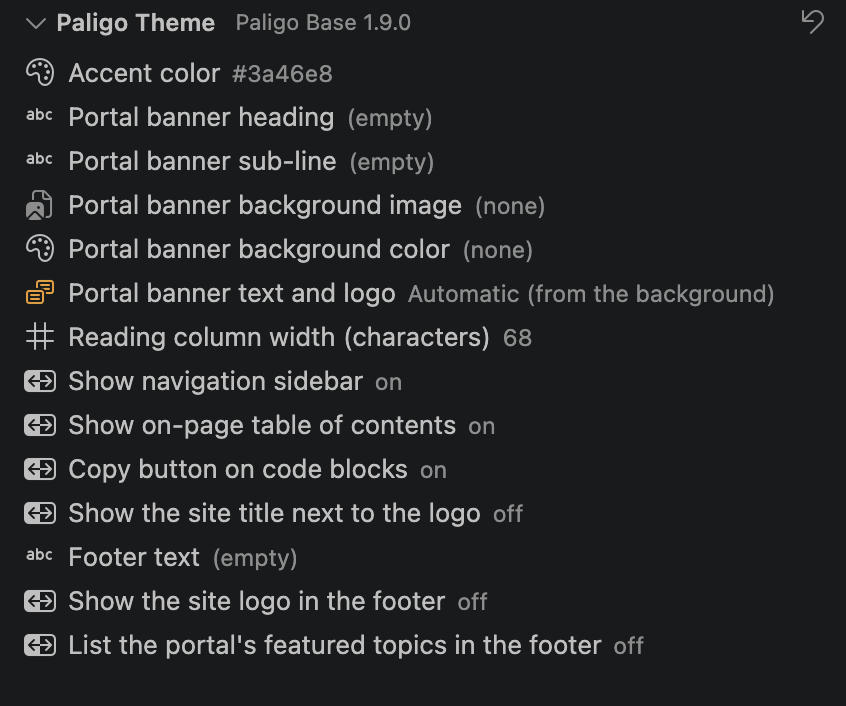
[en] Select an option and choose or enter a new value.
[en] The preview updates with the new value.
[en] To return every option to the theme's default, select Reset theme options to defaults at the top of the Paligo Theme section.
[en] The values you set here apply only to the preview. They aren't pushed with the theme. To set the values a layout publishes with, see [en] Set theme options.
Tipp
[en] If you have moved the Paligo Theme section to another place and can't find it, run Paligo: Restore theme panel to the Explorer.